
checksec is a well-known command-line tool in the Linux security community. Originally a shell script wrapping readelf, it inspects ELF binaries for common exploit mitigations — PIE, NX, stack canaries, RELRO, and FORTIFY_SOURCE. It's a staple in CTFs, penetration tests, and security audits.
But iOS has its own set of mitigations, many of which have no Linux equivalent. Apple's toolchain silently enables protections that Linux distributions still debate. And with the iPhone 17 shipping hardware memory tagging, the gap is only widening.
This post documents the implementation of a checksec equivalent for iOS in Grapefruit, covering the mitigations checked, how to check them, and why some resist binary-level detection.
The Approach
All the checks below work by inspecting four aspects of a Mach-O binary: header flags, load commands, section names, and imported/exported symbols. Entitlement-based checks additionally read the embedded code signature.
In Grapefruit, Frida is used to inspect binaries already loaded in memory — reading the mach_header_64 from the module's base address, walking the load command chain, and enumerating symbols at runtime. But none of these checks fundamentally require runtime access. You can pull the .app bundle from a decrypted IPA and parse it statically with tools like otool, nm, ipsw, codesign, or any Mach-O parser in any language. The runtime approach is used simply because Grapefruit is designed as a dynamic analysis tool — not because the checks require it.
The picture below is Notes app from iOS 26.3:
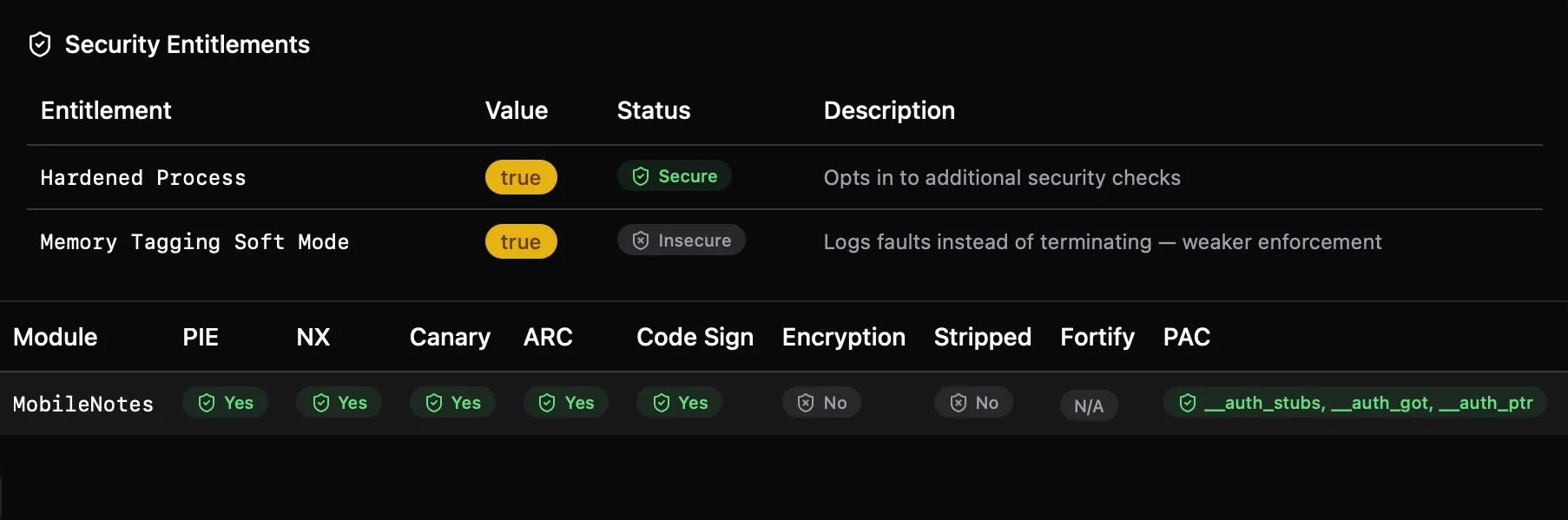
The Checks
1. Position Independent Executable (PIE)
What it does: PIE enables ASLR — the kernel loads the executable at a randomized base address each time, making Return-Oriented Programming (ROP) harder because gadget addresses are unpredictable.
How to check it: Read the Mach-O header flags and look for MH_PIE (0x200000). For dynamic libraries (dylibs), PIE is inherent — they're always position-independent — so it is only flagged for MH_EXECUTE file types.
Statically, otool -hv <binary> prints the Mach-O header flags in human-readable form — look for PIE in the output. This also works for the NX flags below.
In practice, every modern iOS app has PIE enabled. Xcode has defaulted to it since iOS 4.3, and the App Store rejects non-PIE submissions.
2. Non-Executable Memory (NX)
What it does: NX (No eXecute) marks memory regions as non-executable. The stack should never be executable (prevents classic shellcode injection), and ideally the heap shouldn't be either.
How to check it: Two Mach-O header flags control this:
MH_ALLOW_STACK_EXECUTION(0x20000) — if set, the stack is executable (bad)MH_NO_HEAP_EXECUTION(0x1000000) — if set, the heap is also non-executable (better)
Three states are reported: false (stack is executable), true (stack NX only), or "stack + heap" (both protected).
iOS enforces W^X (Write XOR Execute) at the kernel level, so even if these flags are permissive, the kernel won't allow simultaneous write+execute mappings.
3. Stack Canary
What it does: The compiler inserts a random value (the "canary") between local variables and the saved return address on the stack. Before returning, the function checks if the canary was overwritten — a sign of buffer overflow. If it was, the program calls __stack_chk_fail to terminate immediately rather than letting the attacker redirect control flow.
How to check it: Scan the binary's imports and symbols for __stack_chk_fail or __stack_chk_guard.
Statically, nm -u <binary> | grep stack_chk lists these symbols if they are imported.
Clang enables -fstack-protector by default. The symbol check is a reliable indicator — if the binary was compiled with stack protection, these symbols must be present since the canary check code references them. Note that some executables don't have enough code to include stack canary symbols, but it doesn't mean they don't enable it.
4. Automatic Reference Counting (ARC)
What it does: ARC is Objective-C's compile-time memory management. The compiler inserts retain/release calls automatically, eliminating use-after-free and double-free bugs that plague manual reference counting.
How to check it: Look for ARC runtime symbols imported from /usr/lib/libobjc.A.dylib — functions like objc_retain, objc_release, objc_storeStrong, etc. If a binary imports these from the ObjC runtime, it was compiled with ARC.
This check is only meaningful for Objective-C code. Pure Swift binaries use a different reference counting mechanism, and pure C/C++ doesn't have this concept at all.
5. RPATH
What it does: LC_RPATH load commands specify additional directories where the dynamic linker searches for libraries. While useful for development, embedded RPATHs can be an attack vector — particularly @executable_path/../Frameworks/ patterns that might allow dylib hijacking if an attacker can place files relative to the app bundle.
How to check it: Iterate load commands and collect all LC_RPATH entries.
Statically, otool -l <binary> | grep -A2 LC_RPATH extracts the same information.
On iOS, RPATH is not a main security concern. Dylib hijacking — the primary threat RPATH auditing guards against — requires placing a malicious dylib where the loader will find it. On iOS, the read-only filesystem, app sandbox, and mandatory library validation make this impractical. This check is mainly useful on macOS, where the environment is more permissive.
6. Code Signature
What it does: All code running on iOS must be signed. The code signature covers the binary's content, entitlements, and identity. The kernel verifies the signature at page-in time.
How to check it: Identify the LC_CODE_SIGNATURE (0x1d) load command. Its absence is a hard failure — unsigned code simply won't run on stock iOS.
Statically, codesign -dv <binary> validates the signature and prints its details. For just checking presence, otool -l <binary> | grep LC_CODE_SIGNATURE suffices.
7. FairPlay Encryption
What it does: App Store binaries are encrypted with Apple's FairPlay DRM. The LC_ENCRYPTION_INFO_64 load command contains a cryptid field: 0 means decrypted (or the header is present but encryption was stripped), non-zero means encrypted.
How to check it: Read the cryptid field from the encryption info load command. Three states are reported: true (encrypted), "header only" (load command present but cryptid is 0), or false (no encryption load command at all).
Statically, otool -l <binary> | grep -A5 LC_ENCRYPTION_INFO shows the encryption load command and its cryptid value.
This is mainly useful for determining whether a binary has been decrypted (e.g., by tools like bagbak) or is still in its App Store-encrypted form.
8. Symbol Stripping
What it does: Stripped binaries have their symbol table removed, making reverse engineering harder. While it doesn't prevent disassembly, it removes function names, making it significantly more tedious to understand the binary.
How to check it: Check whether the binary's symbol table is empty. nm -m <binary> will show the symbol table — if the output is empty or only contains external symbols, the binary is stripped. Programmatically, parse the LC_SYMTAB load command and check whether nsyms is zero.
9. FORTIFY_SOURCE
What it does: FORTIFY_SOURCE is a compiler/libc feature that replaces dangerous C standard library functions (like memcpy, sprintf, strcpy) with bounds-checked variants (suffixed _chk). When the compiler can determine the destination buffer size at compile time, it uses the fortified version that aborts on overflow.
How to check it: Check for the presence of _chk variants of 13 standard libc functions:
A ratio is reported: how many are fortified vs. how many are fortifiable (i.e., the binary uses the base function or its _chk variant). A binary using memcpy that also imports __memcpy_chk has fortified that call site. A binary using memcpy without the _chk variant has a missed opportunity.
Statically, nm -u <binary> | grep _chk lists the fortified imports. Compare against nm -u <binary> | grep -E '_memcpy$|_sprintf$|_strcpy$' (and the other base functions) to compute the ratio.
10. Pointer Authentication Code (PAC)
What it does: PAC uses the ARMv8.3 cryptographic instructions to sign and verify pointers. Return addresses, function pointers, and vtable entries are signed with a context-specific key. Corrupting a signed pointer causes an authentication failure and crash, defeating ROP and (some) JOP attacks.
Apple has shipped PAC since the A12 chip (2018), making it one of the longest-deployed hardware exploit mitigations in consumer devices.
How to check it: The most direct indicator is the CPU subtype in the Mach-O header. Binaries with PAC enabled are compiled for the arm64e architecture. Statically, otool -hv <binary> will show ARM64E as the CPU subtype. Programmatically, this corresponds to CPU_TYPE_ARM64 (0x0100000c) and CPU_SUBTYPE_ARM64E (0x02), indicating the pointer authentication ABI is in use.
Heuristic approach — section scanning: While the Mach-O header is the definitive source, PAC-enabled binaries also typically contain specialized sections for authenticated pointers:
__auth_stubs— authenticated stub functions (the PLT equivalent with PAC)__auth_got— authenticated Global Offset Table entries__auth_ptr— authenticated pointer sections
Statically, otool -l <binary> | grep -E '__auth_stubs|__auth_got|__auth_ptr' checks for these. This is an indirect sign that confirms the linker has emitted code for the PAC ABI.
Exotic approach — instruction scanning: One could also disassemble the binary and look for PAC-specific instructions like PACIASP or AUTIA.
11. Secure Malloc (Type-Aware Memory Allocation)
What it does: Apple's malloc_type API enables type-aware memory allocation. When enabled via the ENABLE_TYPED_MALLOC build setting, the allocator uses type information to isolate allocations of different types into separate buckets. This prevents type-confusion exploits where an attacker frees one object type and reallocates a different type in the same memory to gain control.
Under the hood, this integrates with xzone malloc — the userspace counterpart to the kernel's kalloc_type. It provides zone isolation, guard pages, and randomization on top of the type separation.
How to check it: Look for malloc_type_* symbol imports: malloc_type_malloc, malloc_type_calloc, malloc_type_realloc, malloc_type_valloc.
Statically, nm -u <binary> | grep malloc_type lists these imports.
Xcode 16+ unifies these under the Enhanced Security (Hardened Heap) capability. When enabled, the compiler emits calls to malloc_type_* instead of standard malloc, passing type descriptors that the allocator uses for bucket placement.
The "System-Only" Tier: Interestingly, while malloc_type is available to all apps, the most aggressive versions of the allocator — featuring specialized symbols like xzm_* (Hardened XZone), sanitizer_* (Redzones/Poisoning), and pgm_* (Probabilistic Guard Malloc) — are currently reserved for critical system daemons like BlastDoor, WebContent, and GPUProcess, according to the libmalloc source code. Finding these markers in a binary is a strong indicator of a high-security system target.
Entitlement-Based Checks
Some mitigations don't affect code generation — there are no special instructions, sections, or symbols to look for. Instead, they are configured through entitlements embedded in the binary's code signature. The tool reads these from the embedded entitlements plist and displays them in a separate panel alongside the binary-level checks.
How entitlements are loaded: The straightforward approach is to write a Mach-O parser that walks the LC_CODE_SIGNATURE load command and parses the code signature SuperBlob to extract the embedded entitlements plist. This works but requires implementing a non-trivial amount of binary parsing.
Grapefruit takes a shortcut: since Frida is already running inside the process, undocumented APIs from Security.framework are available. SecStaticCodeCreateWithPath creates a static code reference from the app bundle URL, and SecCodeCopySigningInformation extracts the signing information — including the entitlements dictionary — from that reference. The entitlements are returned as a native NSDictionary, which is then serialized to a plist for display.
An important detail: entitlements are deliberately loaded from the filesystem (SecStaticCodeCreateWithPath) rather than queried from the running process (e.g., via SecTaskCopyValuesForEntitlements or the low-level csops syscall). Some jailbreak environments patch the in-memory code signature blob to inject additional entitlements — most commonly get-task-allow (to enable debugging) and com.apple.security.cs.disable-library-validation. By reading from the on-disk binary, the original entitlements as signed by the developer are displayed, not the modified set that the jailbroken kernel sees.
Enhanced Memory Tagging Extension (EMTE)
Apple's Memory Integrity Enforcement shipped with iPhone 17 (A19), combining MTE hardware with software hardening that goes beyond ARM's baseline specification. Every memory allocation is tagged with a secret value stored in the pointer's upper bits; the hardware checks the tag on every access and faults on mismatch.
Unlike PAC, EMTE cannot be detected by scanning for special instructions or sections. MTE is an allocator-level feature — the malloc implementation tags allocations and the hardware enforces tag checks transparently. The app binary itself doesn't contain MTE-specific instructions; it's ordinary loads and stores that the hardware validates against the tag metadata.
Instead, EMTE is controlled entirely by entitlements embedded in the code signature:
| Entitlement | Purpose |
|---|---|
com.apple.security.hardened-process | Opts into the hardened process framework |
com.apple.security.hardened-process.checked-allocations | Enables hardware memory tagging |
com.apple.security.hardened-process.checked-allocations.soft-mode | Logs faults instead of crashing (debug) |
com.apple.security.hardened-process.checked-allocations.enable-pure-data | Tags memory containing only data |
Apple's implementation is notably stricter than Android's MTE deployment: it enforces synchronous-only tag checking by default (Android permits asynchronous modes, which trade detection precision for performance). Crucially, it includes Tag Confidentiality Enforcement — a combination of hardware and OS policies that protect the secrecy of memory tags from side-channel and speculative-execution attacks like "StickyTags" and "TikTag".
These entitlements are read from the code signature and displayed in a dedicated entitlements panel. This is already implemented — Grapefruit checks for all four EMTE-related entitlements plus the broader hardened process family (hardened heap, platform restrictions, dyld read-only). The detection surface is fundamentally different from binary-level checks: it's process configuration rather than code generation.
What is Not Checked (Yet)
Codesign Flags (Hardened Runtime & Library Validation)
The code signature embeds a flags field that controls runtime security policies. Two flags are particularly important:
- Hardened Runtime (
CS_RUNTIME, 0x10000) — enforces stricter runtime protections: prevents code injection via dyld environment variables, blocks unsigned executable memory by default, and restricts debugging. Required for notarization on macOS. - Library Validation (
CS_REQUIRE_LV, 0x2000) — ensures the process can only load libraries signed by the same team ID (or Apple). This prevents dylib injection attacks even on macOS where the filesystem is writable.
Statically, these can be inspected with codesign -d --flags <binary>, which prints the flag set in human-readable form.
On iOS, these flags are applied by default to all third-party apps by the kernel and the installation process. An iOS app doesn't need to explicitly opt-in to Library Validation; the sandbox and code signing system enforce it as a baseline requirement.
C++ Bounds-Safe Buffers
Xcode offers the ENABLE_CPLUSPLUS_BOUNDS_SAFE_BUFFERS build setting, which enables -fbounds-safety for C++ code, adding runtime bounds checking to pointer arithmetic and array accesses. This is a promising mitigation against out-of-bounds access bugs, especially in C++ codebases that make heavy use of raw pointers.
There is no reliable binary-level detection method for this yet. Unlike FORTIFY_SOURCE (which substitutes symbol names) or PAC (which creates dedicated sections), bounds-safe buffers don't leave a single definitive marker in the compiled output. There are several heuristics that suggest its presence, but none are conclusive on their own:
| Heuristic | What to look for | Why it's insufficient |
|---|---|---|
| Libc++ hardening | ___libcpp_verbose_abort symbol | Only proves libc++ was built in hardened mode, not that -fbounds-safety is enabled for app code |
| Runtime traps | brk #0x1 instructions (ARM) | Bounds checks emit trap instructions, but so do other UB sanitizers, assertions, and __builtin_trap() calls — no way to distinguish the source |
| Safe containers | std::span in demangled symbols | Using std::span is a coding choice, not proof the compiler enforced bounds checking on all pointer access |
| SDK version | Build version ≥ iOS 17 / macOS 14 | Necessary but not sufficient — the SDK supports it, but the developer may not have enabled it |
Each of these is a positive signal, but even combined they can only suggest "probably enabled" rather than definitively confirm it. A binary could show all four indicators from unrelated causes (e.g., a sanitizer-heavy debug build with modern SDK), or have bounds-safe buffers enabled but not trigger any of these heuristics in its particular code patterns. Until a clear compiler-generated artifact specific to -fbounds-safety is found, this check remains unimplemented.
Summary
| Check | Detection Method | Implementation |
|---|---|---|
| PIE | MH_PIE header flag | Yes |
| NX | MH_ALLOW_STACK_EXECUTION / MH_NO_HEAP_EXECUTION flags | Yes |
| Stack Canary | __stack_chk_fail / __stack_chk_guard symbols | Yes |
| ARC | ObjC ARC runtime imports from libobjc | Yes (ObjC only) |
| RPATH | LC_RPATH load commands | Yes |
| Code Signature | LC_CODE_SIGNATURE load command | Yes |
| FairPlay | LC_ENCRYPTION_INFO_64 cryptid field | Yes |
| Stripped | Symbol table emptiness | Yes |
| FORTIFY | _chk function variants | Yes |
| PAC | CPU subtype (arm64e) / _auth* sections | Yes |
| Secure Malloc | malloc_type_* symbol imports | Yes |
| EMTE | Entitlements in code signature | Yes |
| Bounds-Safe Buffers | No known method | N/A |
A few caveats worth noting. Some of these checks aren't very useful in practice — PIE, NX, Stack Canary, and ARC (Objective-C only) have been enabled by default in modern Xcode SDKs for years. Their absence would be surprising and likely indicates a very old or misconfigured build rather than a deliberate choice. These are included for completeness and for the rare case where something has gone wrong.
Additionally, checks that rely on imported symbols (Stack Canary, ARC, FORTIFY, Secure Malloc) can produce false negatives when the main binary is thin — for example, an app whose main.m is just a few lines delegating to a framework. If the binary doesn't contain enough code to trigger these imports, the symbols simply won't be there, even though the actual application code in its embedded frameworks may well have them enabled.
References
- Memory Integrity Enforcement — Apple Security Research blog
- Enabling Enhanced Security for Your App — Apple Developer Documentation
- Adopting Type-Aware Memory Allocation — Apple Developer Documentation
Cover photo by Jonas Vandermeiren on Unsplash.