This post is the last part of this silly series, but I think it's the only noteworthy one. The exploit chain triggers two XSS across two privileged WebViews and bypasses GateKeeper to execute arbitrary native code outside the sandbox. It works on both High Sierra and Mojave.
- MobileAsset arbitrary URL replacement leads to GateKeeper bypass and SIP protected system resource replacement, which is used to trigger persistent XSS in Dicitonary app
WebKit::WebPage::performDictionaryLookupOfCurrentSelectionto open LookupViewService- LookupViewService
x-dict://URL scheme navigation - Dictionary.app XSS to arbitrary command execution
The demo below is chained with LinusHenze/WebKit-RegEx-Exploit. The sandbox escape part worked for macOS up to 10.14.6
Arbitrary Resource Replacement in OTA
Sometimes the system pulls OTA resources from mesu.apple.com. This OTA component is implemented by the private framework MobileAsset and mobileassetd daemon. Interestingly, it's accessible in WebProcess sandbox.
Source/WebKit/WebProcess/com.apple.WebProcess.sb.in#L601
The usage of this private API (more specifically, ASAssetQuery and ASAsset) can be found here:
This snippet gives you information for all installed dictionaries:
On macOS, these assets are located in /System/Library/Assets(V2?), while /var/MobileAssets is for iOS. This location is protected by SIP on mac, and it seems like there is a similar protection on iOS. Process mobileassetd will check if the desired type is in a hard-coded list; otherwise, it will require the client to have an entitlement named com.apple.private.assets.accessible-asset-types, whose value is a list for all the necessary asset types:
An ASAsset object has some interesting properties:
- __BaseURL
- __RelativePath
- __RemoteURL
Exploiting the daemon itself makes no sense. Though it's got root privilege, it has a sandbox. After playing around with it, I just realized that I could supply an arbitrary URL to make it download that asset to the protected directory. Those delivered contents have no quarantine flag.
Additionally, MobileAsset checks the integrity of an asset, so we need to supply the following fields with the corresponding value:
- _DownloadSize
- _UnarchivedSize
- _Measurement (sha256 hash)
Dictionary XSS to Command Execution
A dictionary bundle for macOS & iOS consists of embed HTML and indexes. Javascript is allowed. To build such a dictionary bundle, we need the Dictionary Development Kit from Additional Tools for Xcode.
How can I create a dictionary for Mac OS X?
In the WebView of Dictionary app (before 10.15), these few lines of javascript bring you a neat calculator.

Wait, how could this even happen?
This delegate method handles navigation for the WebView:
Dictionary -[DictionaryController webView:decidePolicyForNavigationAction:request:frame:decisionListener:]:
From the code above, only onclick event on an anchor can trigger this behavior. Traditional location redirection won't work in this case!
Before 10.15 Dev Beta, file:/// URL would be sent to -[NSWorkspace openURL:] , which is a well known vector for executing local applications.
Don't know if this patch is intentional, but it breaks my exploit indeed. Now file:/// URL is no more qualified for this behavior:
Dictionary just happend to be dynamically updatable by OTA. So I can use the previous design issue to install malformed dictionary asset from a compromised Safari renderer process.
From WebContent Takeover to Dictionary.app
Still one thing left to do. How am I supposed to jump from Safari to Dictionary? URL scheme? But it prompts like this. It's unacceptable.

There is a nice feature in Safari that you can look up a word in a QuickView fasion.

This floating window is triggable from WebProcess IPC by invoking WebKit::WebPage::performDictionaryLookupOfCurrentSelection(). It doesn't ask user for permission.
WebKit/WebProcess/WebPage/Cocoa/WebPageCocoa.mm
To look up a certain word in Dictionary, we can create a text selection before exploiting WebKit.
Then the defination of ExploitStage1 will automatically pop out in this floating layer and triggers our first inter-process XSS. This window is not Dictionary app yet, it belongs to LookupViewService process. Its WebView has no custom delegate handler, so the default behavior in WebKitLegacy is triggered. Simply a locaiton.href navigation to an universal link will jump to another app without user confirmation.
Use dict://ExploitStage2 to finally open Dictionary app and load the second stage XSS.
Full Sandbox Escape
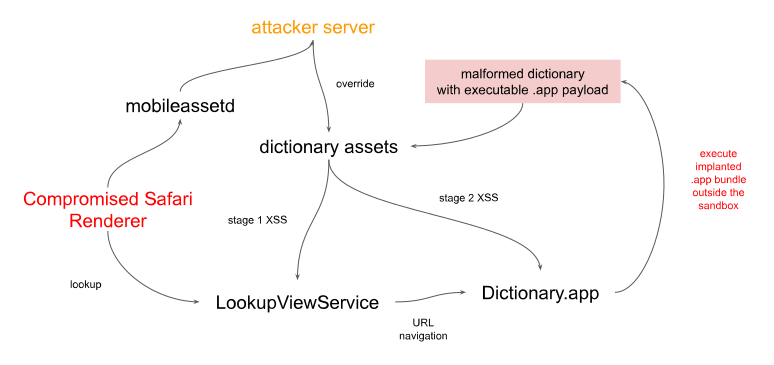
Since the MobileAssets framework does not set com.apple.quarantine attribute, we can just put an executable .app bundle and execute it. I've tried .terminal and .command as well. It didn't work because Dictionary app has a com.apple.security.app-sandbox entitlement, with whom the Terminal app will decline to open the file.
Timeline
- around the beginning of 2019: developed poc and found a chain to exploit
- 2019-09: sadly found the final step, command execution via
file:///URL is patched - 2019-09-27: reported to Apple
- 2020-08-04: Apple addressed a beta release for the complete patch
- 2020-09-17: CVE-2020-9979 assigned to the Asset issue with the final release of iOS14